Running your survey
Everything you need to run the survey well: a plan for introducing it, a ready-made template for your preferred survey platform, and a guide to coding responses for upload into Data Analytics.
A note on survey items
To keep Prior Work free and open, the survey uses two openly-licensed instruments - the HSE Management Standards Indicator Tool (Open Government Licence v3.0) and the Kessler K10 (public domain) - plus bespoke items for the remaining constructs, released under CC BY-SA 4.0. The item bank is new and improves over time; versions are tracked in the construct catalogue.
Before you launch
How you introduce the survey shapes whether people respond honestly, whether leadership acts on results, and whether change follows. A few things to get right before the link goes out.
Under WHS law, workers must be consulted on matters affecting their health and safety. Involve elected HSRs - their visible support is the biggest lever on participation.
Not a performance review, not about individual wellbeing - it measures the conditions of work. Include middle managers; they often carry these hazards too.
Results are aggregate only. Name who processes the data and how (e.g. "responses go to [platform], seen only by [name/role]"). Prior Work collects only the demographics needed for action planning.
Managers hearing about it from their team first signals they're not part of the process. Cover what to say if asked, what they will and won't see, and their role. Elevated results reflect system conditions, not individual failure.
Announce the date beforehand; name the next step afterwards (e.g. focus groups in [month]). Workers who know what's next stay engaged.
A short message from senior leadership: we want to know, we'll act, and no one is disadvantaged for honest answers. HR-only comms read as a compliance exercise; a leadership voice changes the dynamic.
Suggested timing & channels (click to expand)
| When | Channel | Message |
|---|---|---|
| 2 weeks before | Team briefing / all-staff email | Why we're doing this, what's confidential. Watch for the survey link on [date]. |
| 1 week before | Manager briefing (separate) | Full briefing - what they'll see, what they won't, and their role. |
| Launch day | Email + intranet + stand-up | Survey is live. Link, closes [date], ~10 minutes. Results feed into focus groups in [month]. |
| Midpoint | Reminder from senior leader | Response rate nudge. Reiterate confidentiality. Closes [date]. |
| After close | Email to participants | Thank you. Reviewing results. Watch for focus group invitations in [timeframe]. |
| After focus groups | Briefing + written summary | Thanks. Working through everything and will bring recommendations back. Updates in [month]. |
Templates for the key comms. Edit to suit.
Which survey should I use?
The standard instrument - 20 constructs, 86 items, 5-point Likert, pre-coded so no reverse-keying is required at coding time. Loads directly into Data Analytics.
Recommended if you don't already have a validated instrument, or if you want results comparable to Prior Work's general-workforce model.
Already running a survey? Upload data from any instrument - no need to match Prior Work's items. Code to L / M / H, export CSV, and map each column to a factor at upload.
See the coding guide and upload steps below.Jump to guide ↓
Survey instrument
What the survey measures - 20 constructs, 88 items (click to expand)
Survey instrument - ready to download
HSE MS items (Cousins et al. 2004; Open Government Licence v3.0), Kessler K10 items (public domain), and bespoke items (© 2026 Prior Work, CC BY-SA 4.0). Full construct definitions, references, and item-level provenance are in the construct catalogue.
88 items · 20 constructs · 5-point Likert (K10 uses its own none-to-all-of-the-time anchors) · pre-coded scores
Choosing a platform
Any platform supporting Likert items works. Integration requirement: CSV export, one row per respondent.
Free with M365. Export to Excel then CSV. Familiar to most workers.
Common in larger organisations. Paid plans needed for full export.
Enterprise standard. Full export flexibility; good for complex distributions.
Coding surveys following completion
Prior Work expects responses coded L / M / Hper construct. The three steps below convert raw Likert responses for a 5-point scale in Excel. The same logic applies to a different scale on a bring-your-own instrument - just adjust the cutoffs to equal thirds of your scale range.
Note: If you've used the Prior Work template, the heavy lifting is already done - reverse-keyed items come pre-reversed, so you can run all three steps as-is. Reverse-keying only matters for a bring-your-own survey; see Option B below.
Adding demographics (optional)
Columns that aren't L / M / H coded are treated as demographics: they're kept out of the model itself and used to let you view results by group. Two rules make them work well. First, bin, don't itemise - "0-2 years / 2-5 years / 5+ years", never exact tenure; three to five categories per column is the sweet spot, and any group needs at least 10 respondents before it will display. Second, use recognisable column names where you can - team, tenure, work_mode, employment_type, supervisor.
Not confident yet? Save a second copy of your file without the demographic columns and start with that - the analysis works exactly the same, and you can re-upload the full file whenever you're ready.
Where the cut-points sit
L low, M moderate, H high. Construct means split into equal thirds; K10 uses the ABS severity bands, so its high band is wider.
Step 1 - Calculate the construct mean
For each respondent and construct, average the item scores. Treat a subscale as missing when more than a quarter of its items are unanswered. For 4 items in columns B-E:
=AVERAGE(B2:E2)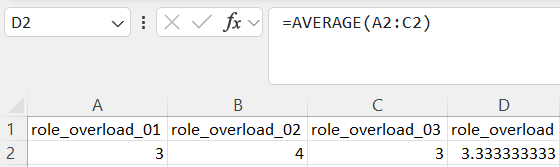
Step 2 - Apply the coding formula (5-point scale, 1-5)
With the construct mean in column A, this formula codes L / M / H by equal thirds of the scale.
=IF(A2<=2.33,"L",IF(A2<=3.67,"M","H"))
Step 3 - K10 is scored differently
K10 items are summed, not averaged, giving a total from 10 to 50. Prior Work collapses the ABS severity bands into three: L = 10-19, M = 20-29, H = 30-50.
=IF(T2<20,"L",IF(T2<30,"M","H"))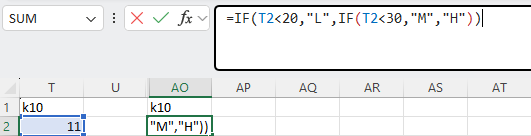
Bring your own survey
Option B - use your existing instrument
Already running a psychosocial or wellbeing survey? Bring that data in directly - no need to switch instruments or match Prior Work's items. Any combination of constructs works. Only requirement: code responses to L / M / H before uploading.
Code responses to L / M / H
Use the coding guide above. Formulas generalise to any Likert scale - adjust cutoffs to equal thirds of your scale range. Reverse-key items where required - see the note below.
Export as CSV - one row per respondent
One row per respondent, one column per construct. Column names can be anything - you map each to a factor at upload. Missing constructs are inferred by the model, not dropped.
Upload and nominate target factors
Load your CSV in Data Analytics. The upload flow maps columns to factors. Prior Work fits the model and produces a report for the constructs you measured.
Reverse-key items worded against their construct
Before coding your BYO survey items, ensure they are coded correctly. Some items, like Role Ambiguity and Workplace Relationships, are worded so a high answer reflects a low level of the construct - reverse-key these (apply 6 - rawon a 5-point scale) before averaging, so a high score always means a high level of the construct. The Prior Work template (Option A) already does this for you.
Survey FAQ - response rates, demographics, translation, L/M/H coding, and more.
See FAQ →